Loading...
Searching...
No Matches
WindowAgentBase Class Reference
WindowAgentBase is the base class of the specifiy window agent for QtWidgets and QtQuick. More...
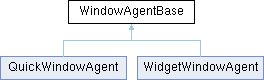
Inheritance diagram for WindowAgentBase:
Public Slots | |
| void | showSystemMenu (const QPoint &pos) |
| void | centralize () |
| void | raise () |
Public Member Functions | |
| ~WindowAgentBase () override | |
| QVariant | windowAttribute (const QString &key) const |
| bool | setWindowAttribute (const QString &key, const QVariant &attribute) |
Detailed Description
WindowAgentBase is the base class of the specifiy window agent for QtWidgets and QtQuick.
It processes some system events to remove the window's default title bar, and provides some shared methods for derived classes to call.
Constructor & Destructor Documentation
◆ ~WindowAgentBase()
|
overridedefault |
Destructor.
Member Function Documentation
◆ centralize
|
slot |
Makes the window show in center of the current screen.
◆ raise
|
slot |
Brings the window to top.
◆ setWindowAttribute()
| bool setWindowAttribute | ( | const QString & | key, |
| const QVariant & | attribute | ||
| ) |
Sets the platform-related attribute for the window. Available attributes:
On Windows,
no-system-menu: Specify a boolean value to disable the system menu.dwm-blur: Specify a boolean value to enable or disable dwm blur effect, this attribute is available on Windows 10 or later.dark-mode: Specify a boolean value to enable or disable the dark mode, it is enabled by default on Windows 10 if the system borders config is enabled. This attribute is available on Windows 10 or later. It configures the native Windows appearance and does not synchronize the theme used by Qt controls. Applications should set QStyleHints::setColorScheme() separately on Qt 6.8 or later when switching their application theme, and use QStyleHints::unsetColorScheme() to follow the system again. These APIs affect the entire application; QStyleHints::colorScheme() is available for reading since Qt 6.5.acrylic-material: Specify a boolean value to enable or disable acrylic material, this attribute is only available on Windows 11.mica:Specify a boolean value to enable or disable mica material, this attribute is only available on Windows 11.mica-alt: Specify a boolean value to enable or disable mica-alt material, this attribute is only available on Windows 11.dwm-border-color: Specifies the color of the window border, this attribute is only available on Windows 11.extra-margins: Specify a margin value to change thedwmextended area geometry, you shouldn't change this attribute because it may break the internal state.border-thickness: Returns the system border thickness. (Readonly)title-bar-height: Returns the system title bar height, some system features may be related to this property so that it is recommended to set the custom title bar height to this value. (Readonly)
On macOS,
no-system-buttons: Specify a boolean value to set the system buttons' visibility.blur-effect: You can specify a string value, "dark" to enable dark mode, "light" to set enable mode, "none" to disable. You can also specify a boolean value,trueto enable current theme mode,falseto disable.glass-effect: Specify a string value, "regular" or "clear" to enable the Liquid Glass effect, "none" to disable. You can also specify a boolean value,trueto enable regular glass,falseto disable. This attribute is only available on macOS 26 and later; enabling it returnsfalsewhen unavailable.glass-corner-radius: Specify a real value to set the Liquid Glass corner radius. This attribute is only available on macOS 26 and later.glass-tint-color: Specify aQColorto set the Liquid Glass tint color, or an invalid value to clear the tint. This attribute is only available on macOS 26 and later.title-bar-height: Returns the system title bar height, the system button display area will be limited to this height. (Readonly)
◆ showSystemMenu
|
slot |
Shows the system menu, it's only implemented on Windows.
◆ windowAttribute()
| QVariant windowAttribute | ( | const QString & | key | ) | const |
Returns the window attribute value.
- See also
- setWindowAttribute()
The documentation for this class was generated from the following files:
- core/windowagentbase.h
- core/windowagentbase.cpp